

CDBFview is a plugin for Total Commander. It allows you to view DBF files in Lister's window (Also in Quick View Panel).
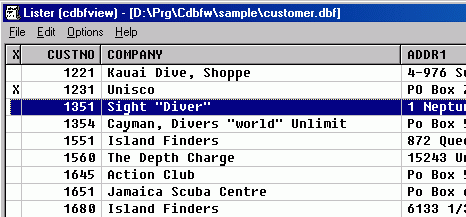
You can:
|
How to install this plugin (32 bit version only):
- Unzip the cdbfview.wlx to the Lister directory (usually c:\wincmd\Lister)
- In Total Commander 5.51 (or newer), choose Configuration - Options
- Open the 'View/Edit' page
- Click 'Configure internal viewer'
- Click 'LS-plugins' button
- Click 'Add' button and select the cdbfview.wlx
- Click OK
ScreenShot